
API USAGE LIMITS
- Please wait a minimum of 15 seconds for successful changes to be reflected
- Do Not poll at an interval quicker than once every 3 minutes
- Do Not have more than 3 open HTTP requests at any given time
Subscribe to our email newsletter to receive a 10% OFF coupon for your next order

The SkyportCloud Open API provides a RESTful cloud
interface to remotely monitor and control Daikin, Amana, and Goodman Smart Thermostats.
Authorized third-party integrators are allowed to read and write information
to and from thermostats connected to Wi-Fi.
The Cloud Open API utilizes token authentication (also called bearer authentication). Daikin SkyportHome users can generate integration tokens using the mobile app and share the integration token with a third-party integrator. In case of security concerns, account owners can invalidate authentication tokens to block access to thermostats.
JSON notation is used as the data exchange protocol in request and response bodies. JSON (JavaScript Object Notation) is a lightweight data-interchange format. It is easy for humans to read and write. It is easy for machines to parse and generate.
Thermostat Compatibility
Owner: The entity who will be utilizing the integration to control the system.
Developer: The entity who will be performing the integration with the Open API. For development purposes, may be the same entity as the owner.
1) The owner must download the SkyportHome and create an account. Then they will need to follow app instructions to add thermostats.
2) The owner must request the Integrator Token by navigating to “SkyportCare” -> “home integration” -> “get integration token”. The owner must agree to the Integration Token Terms. They will be asked to enter their password to finalize the request. They must follow the instruction on the screen.
3) The developer will need an API Key to begin development. The developer must download the same homeowner app as the owner and create an account and enable the developer menu.
How to enable the developer menu:
iOS: Go to the Settings app -> Navigate to the SkyportHome and switch on the developer menu option.
Android: Within the Home App, navigate to "SkyportCare" -> "home integration" and click on the page description 5 times to enable the developer menu
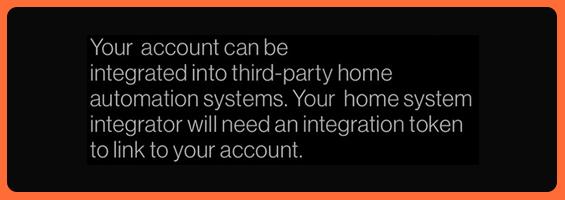
Once enabled, you will be able to navigate to "SkyportCare" -> "home integration" -> "developer". Upon entering the developer option, you must agree to the Daikin B2B Terms and Daikin One Open API License Terms. Enter the name of the application being integrated with the Daikin One Open API and submit the request. Follow the instructions on the screen.
** The API Key and Integrator Token should be kept secure.
https://integrator-api.daikinskyport.com
| URL | /v1/token |
|---|---|
| Request | HTTP POST |
| Request Body |
|
| Response Body | |
Prior to using the Integrator Cloud API, an end user must provide their email and integratorToken to request the accessToken.
*email is case sensitive
| URL | /v1/devices |
|---|---|
| Request | HTTP GET |
| Request Body | None |
| Response Body | |
Get Thermostat List request retrieves the list of locations and thermostats in the account. Each location entry contains the location name and a list of thermostats. Thermostat ID is used to make requests to the other API endpoints.
| URL | /v1/devices/<id> |
|---|---|
| Request | HTTP GET |
| Request Body | None |
| Response Body | |
Get Thermostat Information request retrieves the thermostat configuration and state values. This is a light-weight method that can be polled periodically to retrieve the latest thermostat data.
| URL | /v1/devices/<id>/msp |
|---|---|
| Request | HTTP PUT |
| Request Body | |
| Response Body | |
Update Thermostat Mode request changes the thermostat operating mode, heat and cool setpoints. All data fields are required. Heat setpoint needs to be lower than the cool setpoint by setpoint delta, and both setpoints need to be between the minimum and maximum setpoint limits. Successful requests to change mode and setpoints will turn off schedule and away state. VRV systems with master and master controlled setup have additional constraints. Please refer to data definitions for further details.
| URL | /v1/devices/<id>/schedule |
|---|---|
| Request | HTTP PUT |
| Request Body | |
| Response Body | |
Update Thermostat Schedule Configuration request enables or disables the time period scheduling feature. When schedule feature is enabled, schedule setpoints are observed by the thermostat. Away state takes priority over schedule.
| URL | /v1/devices/<id>/fan |
|---|---|
| Request | HTTP PUT |
| Request Body | |
| Response Body | |
Update Thermostat Fan Settings request sets the fan circulate mode and fan circulation speed. VRV and Mini Split equipment types do not support fan circulation speed. Fan will run maximum speed for unsupported equipment.
* VRV(P1P2) and Single/Multi-Split(S21) equipment types do not support fan circulation mode or fan circulation speed. Fan will run maximum speed.
HTTP response codes represent success or failuer of the operation. Status field in the response body contains additional request or response status information.
Following are possible HTTP response codes.
| HTTP Response Code | Description |
|---|---|
| HTTP 200 | OK - Request succeeded |
| HTTP 400 | Bad request - There was a problem with the request parameters. Check the response body for more details. |
| HTTP 401 | Unauthorized - The accessToken is not valid. |
| HTTP 403 | Forbidden - The integratorApiKey is not valid. |
| HTTP 415 | Unsupported Media Type - The HTTP Header Content-Type is not set to application/json. |
| HTTP 429 | Too Many Requests - Rate of API calls is too high |
| HTTP 500 | Internal error. |
Response other than HTTP 200
| Response Body | |
|---|
| Messages | Description |
|---|---|
| Success | Request is sent to the thermostat |
| NotAuthorizedException | Authentication error |
| Invalid request body | Request body has malperformed data |
| DeviceOfflineException | Device is currently offline |
Following properties are used in data exchange between third-party integrator applications and thermostats. Data types and validation is strictly enforced.
| Name | Type | Read Only | Description |
|---|---|---|---|
| locationName | String | Yes | Location name |
| id | String | Yes | Thermostat ID |
| name | String | Yes | Thermostat name |
| model | String | Yes | Thermostat model |
| firmwareVersion | String | Yes | Thermostat firmware version |
| equipmentStatus | Integer | Yes | HVAC equipment status 1: cool 2: overcool for dehum 3: heat 4: fan 5: idle |
| modeEmHeatAvailable | Integer | Yes | Emergency heat is available as a system mode 0: not available 1: available * If available, mode may equal 4 (emergency heat) |
| mode | Integer | No | Thermostat mode 0: off 1: heat 2: cool 3: auto 4: emergency heat *Master controlled thermostats must be limited to only use modes 3: auto and 0: off |
| modeLimit | Integer | Yes | Thermostat mode limits 0: none 1: all 2: heat only 3: cool only * Only VRV master thermostats should be integrated using Open API * VRV follower thermostats may be integrated under the mode limit: OFF and AUTO only |
| fan | Integer | Yes | System fan 0: auto 1: on *refer to fanCirculate for fan settings |
| fanCirculate | Integer | No | Run the fan on a schedule 0: off 1: always on 2: on a schedule * Unitary Only |
| fanCirculateSpeed | Integer | No | Speed at which fan should run when circulating on a schedule 0: low 1: medium 2: high * Unitary Only |
| heatSetpoint | Float | No | Heating threshold for the "Manual" operating mode in 0.1 degree Celsius increments * Thermostat UI rounds to nearest 0.5 degree increments |
| coolSetpoint | Float | No | Cooling threshold for the "Manual" operating mode in 0.1 degree Celsius increments * Thermostat UI rounds to nearest 0.5 degree increments |
| setpointDelta | Float | Yes | Minimum temperature delta in 0.5 degree Celsius increments |
| setpointMinimum | Float | Yes | Minimum temperature threshold supported by the system in 0.1 degree Celsius increments * For VRV Systems: use MAX (setPointMinimum, 17.0) * For Single/Multi Split Systems: use MAX (setPointMinimum, 18.0) |
| setpointMaximum | Float | Yes | Maximum temperature threshold supported by the system in 0.1 degree Celsius increments * For VRV Systems: use MIN (setPointMinimum, 31.0) * For Single/Multi Split Systems: use MIN (setPointMinimum, 30.0) |
| tempIndoor | Float | Yes | Current indoor temperature. 0.1 degrees Celsius increments |
| humIndoor | Float | Yes | Current indoor humidity percentage |
| tempOutdoor | Float | Yes | Current outdoor temperature. 0.1 degrees Celsius increments |
| humOutdoor | Float | Yes | Current outdoor humidity in percentage |
| scheduleEnabled | Boolean | No | Enable schedule operation |
This assumes you have created your Home App account and registered your Thermostat.
You will need your API Key, email account used for the Home App, and the Integrator Token Requested through the app for your account.
curl --location --request POST "https://integrator-api.daikinskyport.com/v1/token" \

--header "x-api-key: ${apiKey}" \

--header "Content-Type: application/json" \

--data-raw "{

    "email": "${homeAppEmail}",

    "integratorToken": "${integratorToken}"

}"
Successful Response Example:
{

    "accessToken": "accessToken",

    "accessTokenExpiresIn": 900,

    "tokenType": "Bearer"

}
*The accessToken needs to be requested every time it expires and does not expire if other Access Tokens are requested. The accessToken must be in the authorization header for all of the remaining GET and PUT requests.
Example curl command:
curl --location --request GET "https://integrator-api.daikinskyport.com/v1/devices/" \

--header "Authorization: Bearer ${accessToken}" \

--header "x-api-key: ${apiKey}"
Example Response:
[

    {

        "locationName": "Country House",

        "devices": [

            {

    "id": "1abcdef2-345g-67hi-8jk91-123456ab7c89",

                "name": "Main Room",

                "model": "ONEPLUS",

                "firmwareVersion": "2.3.5"

            },

{

    "id": "1abcdef2-345g-67hi-8jk91-123456ab7c90",

                "name": "Upstairs",

                "model": "ONEPLUS",

                "firmwareVersion": "2.3.5"

            }

        ]

    },

    {

        "locationName": "Summer House",

        "devices": [

	{

                "id": "1abcdef2-345g-67hi-8jk91-123456ab7c91",

                "name": "Main Room",

                "model": "TOUCH",

                "firmwareVersion": "2.3.5"

            }


       ]

    }

]
Example curl command:
curl --location --request GET "https://integrator-api.daikinskyport.com/v1/devices/${thermostatId}" \

--header "Authorization: Bearer ${accessToken}" \

--header "x-api-key: ${apiKey}"
Successful Response Example:
{

    "fanCirculate": 1,

    "tempIndoor": 23.1,

    "mode": 0,

    "humIndoor": 42,

    "setpointMinimum": 10,

    "fan": 0,

    "tempOutdoor": 14,

    "equipmentStatus": 4,

    "setpointDelta": 2,

    "modeEmHeatAvailable": false,

    "coolSetpoint": 20,

    "setpointMaximum": 32,

    "humOutdoor": 44,

    "geofencingEnabled": false,

    "heatSetpoint": 17.1,

    "scheduleEnabled": false,

    "modeLimit": 1,

    "fanCirculateSpeed": 2

}
Example on how to set the thermostat to HEAT mode along with the cool and heat setpoints.
*Please wait a minimum of 15 seconds before polling to determine if the changes were successfully made.
Example curl command:
curl --location --request PUT "https://integrator-api.daikinskyport.com/v1/devices/${thermostatId}/msp" \

--header "Authorization: Bearer ${accessToken}" \

--header "x-api-key: ${apiKey}" \

--header "Content-Type: application/json" \

--data-raw "{

    "mode": 1,

    "heatSetpoint": 20.5,

    "coolSetpoint": 23.5

}"
Successful Response Example:
{

    "message": "Write sent"

}
Example curl command:
curl --location --request PUT "https://integrator-api.daikinskyport.com/v1/devices/${thermostatId}/schedule" \

--header "Authorization: Bearer ${accessToken}" \

--header "x-api-key: ${apiKey}" \

--header "Content-Type: application/json" \

--data-raw "{

    "scheduleEnabled": false

}"
Successful Response Example:
{

    "message": "Write sent"

}
Updating the thermostat fanCirculate and fanCirculateSpeed settings.
Example curl command:
curl -location -request PUT "https://integrator-api.daikinskyport.com/v1/devices/${thermostatId}/fan" \

-header "Authorization: Bearer ${accessToken}"" \

-header "x-api-key: ${apiKey}" \

-header "Content-Type: application/json" \

-data-raw "{

    "fanCirculate": 2,

    "fanCirculateSpeed": 0

}"
Successful Response Example:
{

    "message": "Write sent"

}